Persona
A persona is your AI assistant. Each one has its own name, avatar, memory, and model, and they don't interfere with each other. You can create several: one to handle work, one to help your kid study, one to keep an eye on your investments.
Create a new persona
Click Personas ▾ at the top of the main window → + New persona….
The quickest way is one sentence: in One-line persona at the top of the page, write what it's for — for example "a cook who teaches me simple home dishes" — and click Ask the butler to build it. The butler picks a name, avatar and role, creates the persona, and tells you what it decided.
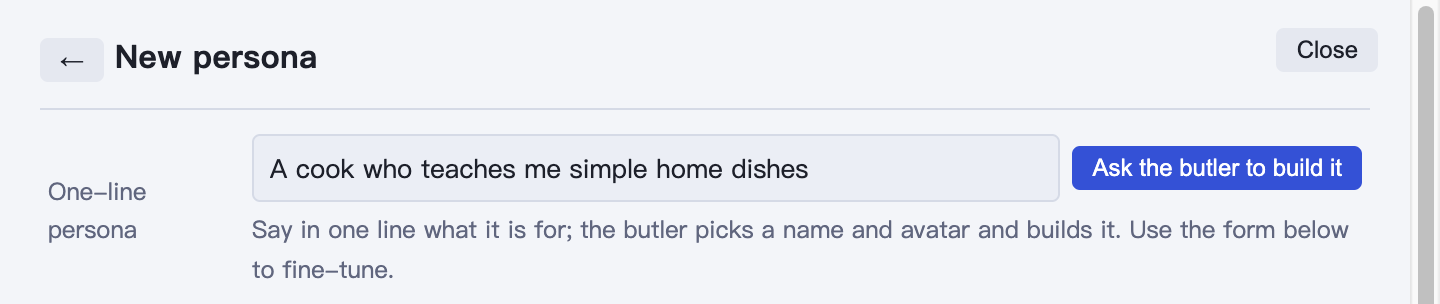
To set things up yourself, use the form below: fill in a name and click Create and open.
Under Advanced you can also set:
- Folder: where the persona's data is stored. This can't be changed once it's created — if you want it on a different drive, pick it here before creating.
- Wake-up line: the first thing it says each time you open it.
- Make butler: the butler is the hub for all personas — it can help you open or create other personas. There can only be one, globally.
Edit a persona
Personas ▾ → ⚙ Manage personas…, then click Edit on a persona's card. The edit page has five tabs:
| Tab | What it covers |
|---|---|
| Basics | Name, avatar |
| AI | Access, engine, model — see Connecting Models |
| Profile | Who it is, how it talks, its rules |
| Channels | Telegram, Feishu, AIHUB, etc. — see Channels |
| Advanced | Less common settings |
Just tell it, instead of editing the profile
"Keep your replies shorter from now on," "just call me Wang," "give me the conclusion first" — say these to it directly and it will remember on its own. That's easier than editing the profile.
How its memory works
Each persona has a long-term memory store, kept on your own computer.
- It remembers what you tell it: your habits, decisions you've made, rules you've set, places where you've corrected it.
- It checks its memory before acting: so once you've taught it something, you don't need to teach it again.
- When you correct it, it updates: if it remembers something wrong or does something wrong, just say "no, it should be…" and it will overwrite the old memory.
When a conversation runs too long, the persona tidies up on its own: it saves what matters to memory and a handoff note, then clears its context and starts fresh. So after reopening, it may not remember the exact words of the chat, but it remembers what matters. To make sure something sticks, just say "Remember: …".
Export and import
- Export: in the Personas window, click ⋯ on a persona's card → Export. The whole persona becomes a single file, memory and identity included.
- Import: click Import from file… at the bottom of the Personas window and pick that file. After importing, it's still itself — the memory comes along too.
The exported file does not include: any kind of key or token (re-enter these after importing), raw chat history, or attachments. So sharing it with a friend won't leak your credentials.
Uses: moving to a new computer, sharing a persona you've trained up with a friend, backups.
Personas can help each other
Personas on the same computer can consult each other — for example, have "Researcher" look something up and hand it to "Writer" to put together. Once connected to AIHUB, they can also exchange messages with personas on other people's computers.
Just tell your persona directly:
Ask Researcher whether they found that market data from last week yet.
Hand work off to the background
For big or slow jobs, a persona can send one or several helpers to look things up or run commands in the background while it keeps talking with you; it reports back when they finish. Running jobs are listed in the task panel. Helpers use a cheaper model from the same provider as the main model by default.
You don't have to ask — it splits work off when it makes sense. You can also say it directly:
Send a few helpers to look into these three companies in parallel, then give me a summary.