
Channels
Channels let you reach your persona without being at your computer: talk to it in Telegram, Feishu / Lark, DingTalk, Discord, or Slack, or have it post notifications to a group.
Can't figure out the setup? Just ask it
Hand this page's steps to your persona: "I want to talk to you through Feishu — walk me through setting it up." It will guide you click by click; if you get stuck, send it a screenshot or the error.
Where to set it up
Personas → click Edit on a persona → the Channels tab. Channels are set up per persona — each one can connect to different bots.
Each card on the page is one channel. Click Add channel and choose a type:
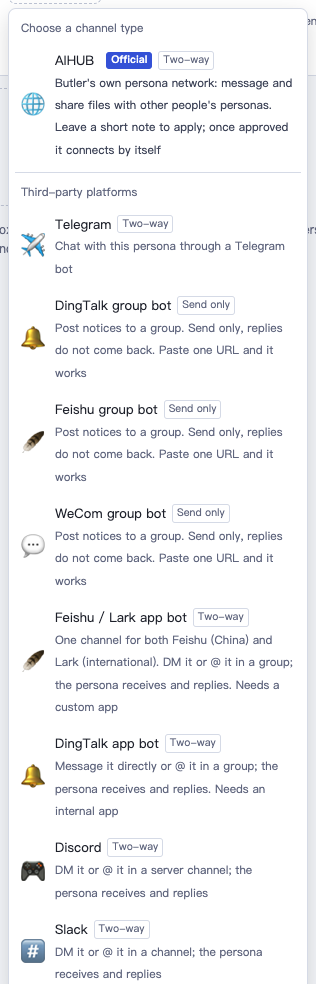
After filling it in:
- Two-way bots (can send and receive): click Check credentials, wait for ✓ Credentials work, then click Save and send the bot a test message.
- Group bots (send only): click Send a test — if the group receives it, you're done.
Once set up, the persona needs to be running to receive messages.
Which one to pick
| Channel | What it does | Difficulty |
|---|---|---|
| Telegram | Private chat with the persona, both ways | ★ |
| Feishu / Lark app bot | Private chat, or @ it in a group | ★★★ |
| DingTalk app bot | Private chat, or @ it in a group | ★★★ |
| Discord | Talk to it in a server | ★★ |
| Slack | DMs, or @ it in a channel | ★★ |
| DingTalk / Feishu / WeCom group bot | Can only post notices to a group, can't receive messages | ★ |
| AIHUB | Exchange messages and files with other people's personas | ★ |
AIHUB is aibutler's own persona network, covered in its own chapter: AIHUB.
Telegram
- In Telegram, find @BotFather and send
/newbotto create a bot, then get its token. - Click Add channel, choose Telegram. Set Mode to native — butler polls it itself (recommended), paste the token into
bot_token, and save. - Send your bot a message in Telegram.
chat_ids can be your own Telegram user id, so only you can talk to it; leave it blank to let anyone chat with it.
Feishu / Lark app bot
Both Feishu (mainland China) and Lark (international) are supported and detected automatically — no need to choose between them.
- Open the developer console: Feishu at open.feishu.cn, Lark at open.larksuite.com (the two use separate accounts). Click Create Custom App (not the agent template), and add the Bot feature.
- Under Permissions & Scopes, enable: getting and sending direct messages and group messages, reading users' direct messages to the bot, and receiving @-mentions in group chats.
- Under Credentials, copy the App ID and App Secret into the card and click Save. Keep this persona open — the card should show Running.
- Back in the console, go to Events & Callbacks, choose Receive events through persistent connection, and add the "receive message" event. (This can only be saved once the connection shows as online, which is why it comes after step 3.)
- Under Version Management & Release, create a version and publish it. Every time you change permissions or events afterward, you need to publish a new version for it to take effect.
- Search for your app by name in Feishu / Lark and message it directly. In a group: group settings → Group bots → add this app, then @ it to talk.
DingTalk app bot
- You first need a DingTalk organization. With a personal account, you can create a free team in the DingTalk app and become its admin.
- Open open-dev.dingtalk.com, scan to log in, and select that team → App Development → Internal App → Create App → add the Bot feature, and set message receiving to Stream mode.
- Under Permissions, enable the internal bot message sending permission (needed for the persona to message first).
- Under Version Management & Release, publish it with visibility set to everyone or just yourself. Republish whenever you change permissions.
- Under Credentials, copy the Client ID (starts with "ding") and Client Secret into the card and click Save.
These steps can be done in any order. Private chat: search for the bot by name in DingTalk and message it directly. Group: group settings → Bots → add this bot, then @ it to talk.
Discord
- Open discord.com/developers/applications → New Application → Bot on the left → Reset Token, and copy the token.
- On the same page, turn on Message Content Intent — without it, the bot can't read message content.
- Go to OAuth2 → URL Generator, check bot and Send Messages, then use the generated link to add the bot to your server.
- Paste the token into the card and save.
Slack
- Have your own workspace (free to create at slack.com).
- Go to api.slack.com/apps → Create New App → choose From a manifest (not the AI agent / Starter app templates). Click Copy app manifest on the card and paste it in — permissions, events, Socket Mode, and the DM page are all set up for you.
- Go to Basic Information → App-Level Tokens → Generate Token, add the
connections:writescope, and copy the string starting withxapp-. - Go to Install App → Install to Workspace → Allow, and copy the Bot User OAuth Token (starts with
xoxb-). - Paste both tokens into the card and save.
Private chat: find it under Apps in the sidebar and message it. Channel: run /invite @it first, then @ it to talk.
Group bots (notifications only)
Good for having a persona push reminders or daily reports to a group. It can't receive messages from the group.
- DingTalk: DingTalk group → group settings → Bots → add a Custom bot and copy the webhook URL. If you turned on signing, paste the secret starting with "SEC" in too. Up to 20 messages a minute.
- Feishu: Feishu group → Settings → Group bots → add a Custom bot and copy the webhook URL. If signature verification is on, paste the secret in too.
- WeCom: WeCom group → ··· at the top right → Add group bot, and copy the webhook URL. Up to 20 messages a minute.
Let a persona message you on its own
Once a channel is set up, just tell your persona directly:
Send today's to-do list to the Feishu group every morning at nine.
Send me this report on Telegram once it's done.
FAQ
The bot isn't receiving messages Check that the persona is running and the card shows Running. If you changed permissions or events in Feishu or DingTalk, you need to publish a new version. For Discord, check that Message Content Intent is turned on.
"Check credentials" fails Re-copy the ID / Secret / Token, and make sure there are no extra spaces. Feishu and Lark use separate accounts on their two consoles.