
Connecting Models
A persona needs to be connected to an AI model before it can think and talk. There are two ways: a Claude subscription, or your own API key. Both can be active at the same time — each persona picks its own.
Not sure how to set it up?
Just ask your persona: "I have a DeepSeek key, how do I connect it?" It will tell you exactly where to click.
Two places, two different jobs
| Where | What it manages |
|---|---|
| System Settings (Settings at the top right of the main window) | Stores "keys": Claude subscription, API keys. Storing one doesn't mean it's in use. |
| Personas → a persona → the AI tab | Which key, which engine, and which model this persona uses. |
Store it in System Settings first, then pick it on the persona's side.
Option 1: Claude subscription
If you have a Claude Pro or Max subscription, your persona can run on it.
- Open System Settings → Model providers → Claude subscription, and click Turn on.
- After confirming, it downloads Anthropic's Claude Agent SDK (about 110 MB). Once that's done, click Restart now.
- After restarting, click Log in to Claude and authorize it in your browser.
- Once it shows On and logged in, you're set.
Then, on the persona's AI tab, set Access to Use the subscription account.
Option 2: API key
Store a key
Open System Settings → Model providers → API credentials, click + Add one, and click your provider first:
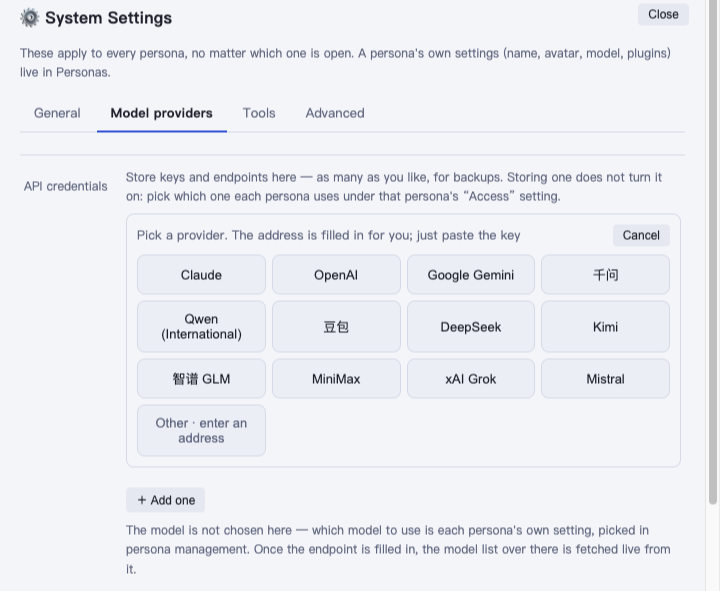
The list has Claude, OpenAI, Google Gemini, Qwen (mainland China / international), Doubao, DeepSeek, Kimi, Zhipu GLM, MiniMax, xAI Grok and Mistral. The address is filled in for you; just paste the key your provider gave you. For anything not listed (gateways, for example), click Other · enter an address and fill in the address and key your gateway gives you.
Click Save, then Test to confirm it connects. You can store several. The one marked Default is used when a persona hasn't picked a credential, or the one it picked gets removed.
Let a persona use it
When you create a persona with a key, click a tier under How capable?: Top · pricey, Strong, Everyday · recommended or Budget. The app tests that key on the spot to find a model in the tier; a model another persona already uses on that key is marked "already in use on this key". To choose the model yourself, open Pick a model myself.
For an existing persona, go to Personas → the persona → the AI tab:
- Access: choose Use the key saved in system settings, then pick which one.
- Engine: usually Butler engine (multi-model).
- Model: pick one from the dropdown; if it's not listed, choose Other · type a model name and enter it yourself.
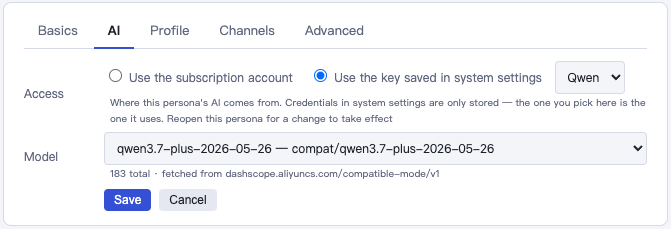
Reopen the persona for the change to take effect.
Typing a model name yourself
Names picked from the dropdown already carry the right prefix. When you type one: for OpenAI-compatible endpoints (Qwen, Doubao, Kimi and most gateways) prefix it with compat/, e.g. compat/qwen-plus; for OpenAI itself prefix it with openai/; for Claude just write the model name. Not sure? Click Test first, or ask your persona.
Switch from the top bar
If you change models often, open System Settings → General → Quick model switch and tick Show in the top bar. A "key · model ▾" chip appears next to the persona name on the main screen; click it to change the current persona's key and model. Switching keys saves the current conversation into memory first, then reopens the persona.
What's the difference between the two engines
| Butler engine (multi-model) | Claude Code | |
|---|---|---|
| What it is | Built into aibutler | Anthropic's official Claude Agent SDK |
| Models it supports | Claude, OpenAI, domestic Chinese models, various gateways | Claude only |
| When it's used | The default when using an API key | Used automatically with a Claude subscription |
Personas on a subscription always run on Claude Code; personas using a key can pick either one — the Engine option only appears once the Claude subscription component is installed.
Web search
When using the Butler engine, a persona defaults to the model's built-in search (some models don't have one). If it can't search, or you want to change it, see Web Search.
FAQ
The persona says "has no model selected and cannot reply" Go to Personas → that persona → the AI tab and pick a model.
Getting a 401 error, or "bad key" Click Test on that key in System Settings. If it fails, re-copy and paste the key — watch for extra spaces at either end.
Getting a 400 error, on and off Usually the gateway or provider is temporarily rejecting requests — try again shortly. If it keeps happening, try a different route, or send the raw error to your persona and let it look into it.
Want different personas to use different models Each persona's AI tab is set independently — they don't affect each other.