
Web Search
Personas can search the web. For personas on the Butler engine, the search method is set in System Settings; personas on a Claude subscription use Claude's own search, unaffected by this page.
Default: the model's built-in search
With nothing configured, a persona uses whatever search its model provider includes. Claude and OpenAI generally have one; some models or gateways don't, and then it can't search.
Add your own search engine
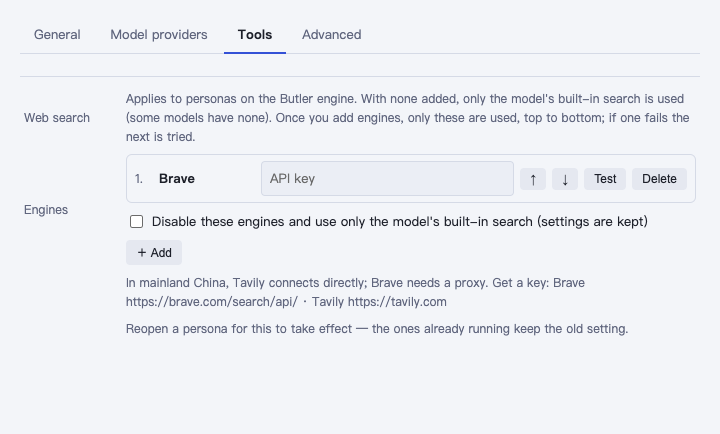
System Settings → Tools → Web search:
- Click + Add and pick one from the list that opens: Brave, Tavily or SearXNG.
- Fill in a key if one's needed; for SearXNG, fill in your own server address.
- Click Test and look for "Works" and a first result.
- If you've added several, use the up/down arrows to set the order — the one on top is tried first, and it falls through to the next if one fails.
- When you close the settings window it asks whether to save your changes — click Save.
| Engine | Needs a key | Direct from mainland China |
|---|---|---|
| Brave | Yes (apply) | No, needs a proxy |
| Tavily | Yes (apply) | Yes |
| SearXNG | Your own server address | Depends on your server |
In mainland China, add Tavily — it connects directly.
Once you add one, only added engines are used
As soon as you add an engine, the persona uses only these — not the model's built-in search anymore. To switch back to the model's own search temporarily, check Disable these engines; your configurations stay saved, and unchecking it restores them.
Reopen the persona for changes to take effect.